The Freelancer’s Guide to Batching Tasks for Maximum Efficiency

Freelancing means wearing every hat. You’re the designer, the accountant, the marketer, and the customer service rep. Switching between these roles dozens of times a day drains your energy faster than the work itself.
Task batching solves this problem by grouping similar activities into focused blocks. Instead of answering emails between client calls and invoicing during creative work, you dedicate specific time to each type of task. The result? Less mental whiplash and more actual progress.
Task batching for freelancers groups similar tasks into dedicated time blocks, reducing [context switching](https://www.apa.org/topics/research/multitasking) and mental fatigue. By organizing work around task types rather than jumping between different activities, freelancers complete more work in less time while maintaining focus. This method works best when combined with honest scheduling, clear boundaries, and regular adjustments based on your actual workflow patterns and energy levels.
Why switching tasks costs you more than you think
Your brain needs time to shift gears. Scientists call this “context switching,” and it’s expensive.
Every time you move from writing a proposal to editing a design file to checking Slack, your brain has to reload an entirely different set of rules, vocabulary, and priorities. That transition isn’t instant. It can take 15 to 25 minutes to regain full focus after switching tasks.
For freelancers managing three to five clients simultaneously, this adds up fast. If you switch contexts 20 times a day, you could lose three to four hours just getting back into the zone.
Task batching eliminates most of these transitions. You stay in one mental mode longer, which means your brain spends more time producing and less time reloading.
How task batching actually works
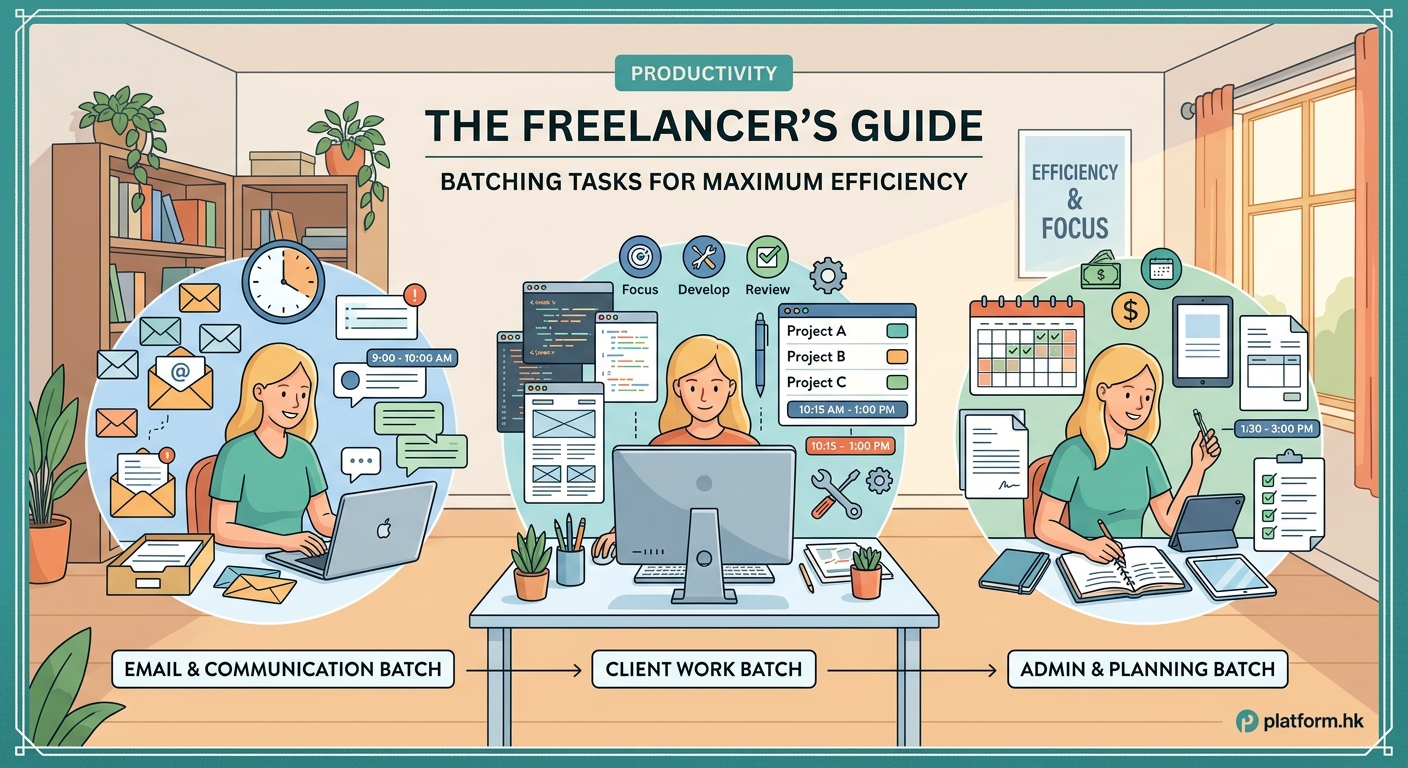
The concept is simple. You group tasks by type and tackle them in one sitting.
Instead of this scattered schedule:
- 9:00 AM: Answer emails
- 9:30 AM: Design mockup for Client A
- 10:15 AM: Invoice Client B
- 10:30 AM: Answer more emails
- 11:00 AM: Write blog post for Client C
- 11:45 AM: Schedule social media
- 12:00 PM: More emails
You batch similar work:
- 9:00 AM to 11:00 AM: All creative work (design, writing, editing)
- 11:00 AM to 12:00 PM: All administrative tasks (invoicing, contracts, file organization)
- 1:00 PM to 2:00 PM: All communication (emails, messages, client calls)
Your brain stays in “creative mode” for two solid hours, then shifts once to “admin mode,” then once more to “communication mode.” Three transitions instead of seven.
What to batch and what to keep separate
Not every task fits neatly into a batch. Some require immediate attention. Others work better when spread throughout the week.
Here’s what works well in batches:
- Content creation (writing, designing, video editing)
- Email and message responses
- Social media scheduling
- Invoicing and expense tracking
- Research and learning
- Client onboarding paperwork
- Meeting preparation
Here’s what usually doesn’t:
- Urgent client requests
- Time sensitive approvals
- Scheduled calls and meetings
- Tasks requiring fresh perspective after a break
The key is recognizing which activities share similar mental energy. Writing a newsletter and designing a logo both require creativity, but they use different parts of your brain. Batch the newsletter with blog posts. Batch the logo with other visual work.
Setting up your first batching system

Start small. Trying to batch everything on day one leads to frustration.
- Track your tasks for one week without changing anything. Note what you do, when you do it, and how often you switch between different types of work.
- Identify your three most frequent task types. For most freelancers, this includes creative work, communication, and administrative tasks.
- Choose one task type to batch first. Pick the one that gets interrupted most often.
- Block out two to three hours twice a week for that task type only. Protect this time like you would a client meeting.
- After two weeks, add a second task type to your batching routine. Keep building from there.
This gradual approach lets you test what works without overhauling your entire schedule at once.
Common batching mistakes and how to avoid them
Even experienced freelancers stumble when implementing task batching. Here are the patterns that cause problems:
| Mistake | Why it fails | Better approach |
|---|---|---|
| Batching unrelated tasks | Grouping “computer work” together still requires context switching | Batch by mental mode, not location or tool |
| Making batches too long | Four hour blocks lead to burnout and diminishing returns | Cap batches at 90 to 120 minutes with breaks |
| Ignoring energy patterns | Forcing creative work during your afternoon slump wastes the method | Match task types to your natural energy cycles |
| Never adjusting the system | Your client mix and project types change over time | Review and modify batches monthly |
| Skipping buffer time | Back to back batches leave no room for overruns | Add 15 minute buffers between batches |
The biggest mistake? Treating batching like a rigid rule instead of a flexible framework. Your Tuesday might need different batches than your Thursday. Client deadlines will sometimes interrupt your perfect schedule. That’s normal.
Batching when clients expect instant responses
“But my clients need me to be available” is the most common objection to task batching.
Here’s the reality: most clients don’t actually need instant responses. They just expect them because that’s what you’ve trained them to expect.
Set clear communication windows. Tell clients you check email at 11 AM and 4 PM daily. For truly urgent matters, provide a backup contact method like a phone number you only use for emergencies.
Most freelancers who try this discover their “urgent” messages drop by 80%. Clients adjust. They plan ahead. They solve small problems themselves.
For the remaining 20% of genuinely time sensitive work, build in flexibility. Your batching system should include daily review points where you can shift priorities if needed.
“I started batching my design work into morning blocks and client communication into afternoon blocks. My clients didn’t notice any difference in service quality, but I finished projects 30% faster because I stopped fragmenting my creative time.” — Sarah Chen, freelance brand designer
Combining batching with other productivity methods
Task batching plays well with other systems. You don’t have to choose one approach.
Time blocking works naturally with batching. Your calendar shows both when you work and what type of work you’re doing. A Monday morning block labeled “Content Batch” tells you exactly what mental mode to enter.
The Pomodoro Technique fits inside batches. Use 25 minute focus sprints for individual tasks within your two hour content creation batch.
Theme days take batching further by dedicating entire days to one type of work. Mondays for client work, Tuesdays for marketing, Wednesdays for admin. This works well for freelancers with larger projects that need sustained attention.
Energy management enhances batching effectiveness. Schedule your most cognitively demanding batches during your peak energy hours. Save routine batches for your natural afternoon dip.
Building batches around client work
Client projects don’t always fit neat categories. A website project might include design, copywriting, client communication, and technical implementation.
The solution is batching across clients, not within them.
Instead of working on Client A’s entire project Monday morning, batch all your design work for every client into one block. Tuesday morning handles all copywriting. Wednesday covers technical work.
This approach has two benefits. First, you stay in the same mental mode across projects. Second, you often find efficiencies. That CSS solution you figured out for Client A might also work for Client B. The research you did for one article informs another.
The exception is large projects that need sustained focus. If you’re building a complex system that requires holding multiple variables in your head, batching might mean dedicating a full day or week to that one client.
Tracking what actually gets done
Batching only works if you’re honest about capacity.
Most freelancers overestimate how much fits into a batch. A two hour content batch might realistically produce one polished article or two rough drafts, not the five pieces you hoped for.
Track your actual output for a month:
- How many emails do you process in a one hour communication batch?
- How many invoice line items can you handle in 30 minutes?
- How much writing do you complete in a 90 minute creative batch?
Use these real numbers to plan future batches. If you know you can write 800 words per hour, you can accurately schedule a 2,400 word article into a three hour batch plus editing time.
This removes the frustration of constantly running over time and the guilt of unfinished task lists.
Adjusting batches for different project phases
Your batching needs change based on where projects stand.
During discovery and planning phases, you need more communication batches. You’re asking questions, gathering requirements, and aligning expectations.
During execution, creative and technical batches dominate. You’re head down producing work.
During revision and delivery, communication batches return. You’re incorporating feedback and coordinating handoffs.
Build flexibility into your weekly template. Maybe Mondays always include a communication batch because that’s when clients typically send weekend thoughts. Fridays might hold a planning batch where you review the week and prep for the next one.
When batching doesn’t work
Some freelance work resists batching. Recognize when to use other methods.
Crisis management and troubleshooting require immediate attention and don’t batch well. If you’re a freelance developer and a client’s site goes down, you can’t wait for your next technical batch.
Highly collaborative work with real time feedback loops works better with dedicated project time. If you’re co-creating something with a client over video calls and shared screens, batching fragments the creative flow.
Exploratory creative work sometimes needs space to breathe. The early stages of a big idea might benefit from distributed thinking time rather than concentrated batches.
The goal isn’t to batch everything. The goal is to batch the routine work that drains energy through constant context switching, freeing up mental space for work that genuinely needs flexibility.
Making batching stick beyond the first week
New systems feel great for three days, then life happens.
The difference between freelancers who sustain batching and those who abandon it after two weeks comes down to three factors:
Visible scheduling. Put your batches on a calendar you actually look at. Digital, paper, wall mounted, whatever you check multiple times daily. “I’ll batch emails in the afternoon” is too vague. “Email batch 2:00 PM to 3:00 PM” creates accountability.
Preparation rituals. Start each batch the same way. Close unnecessary tabs. Put your phone in another room. Make tea. Play specific music. These cues signal your brain that you’re entering a focused mode.
Regular reviews. Every Friday, spend 15 minutes reviewing the week. Which batches worked? Which got interrupted? What needs to change next week? This prevents you from mindlessly repeating a system that stopped working three weeks ago.
Your brain on focused work
Task batching isn’t about cramming more work into your day. It’s about reducing the hidden tax of constant task switching.
When you protect your attention by grouping similar work, you finish faster and feel less exhausted. The quality improves because you’re not splitting focus. Your clients get better results because you’re fully present in each type of work.
Start with one batch this week. Pick the task type that gets interrupted most often and give it two protected hours. Notice how different the work feels when you’re not constantly shifting gears.
The goal isn’t perfection. The goal is progress toward a schedule that works with your brain instead of against it.